
Good aged domains do not sit on a list for long, and nobody can refresh one all day. A domain alert is the search you would run anyway, saved: we match it against the whole aged-domain catalogue every day and e-mail you the domains that are new to you, with their metrics, their price and a link to vet or buy each one. No hosting plan is needed — every account can save a search.
💡 One e-mail, however many alerts you save
All of your alerts share a single daily e-mail, grouped by search, and when nothing new matched we send nothing at all.
Save your first alert
Open the aged-domain list and set the filters you care about — TLD, authority metrics, referring domains, traffic, price, niche, language, the year the domain was first seen. Then press Save this search & get alerts beside the Search button.
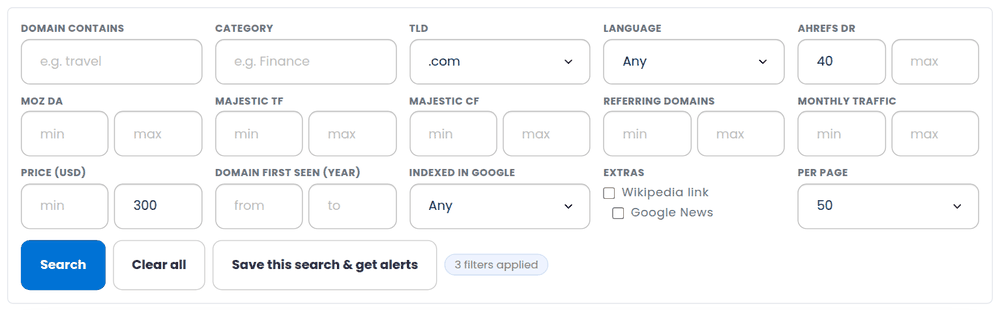
The next screen tells you how many domains match right now and lets you name the alert. Those domains are your starting point, not news: from then on you only hear about domains you have not been shown before.
What arrives, and when
The catalogue is matched against every active alert once a day. If something new fits, you get one e-mail listing the matches under each alert, each with its authority metrics, referring domains, estimated traffic and price, a link to run a full vetting report and a link to its page in the shop. A domain whose price has dropped by a tenth or more comes back with the old price beside the new one.
- A domain is never announced twice by the same alert.
- Nothing new means no e-mail.
- Every e-mail can pause the alert that sent it in one click, without signing in.
Manage your alerts
The domain alerts page lists every search you have saved, what it looks for in plain English, how many domains match it right now, how many it has told you about and when it last e-mailed you.
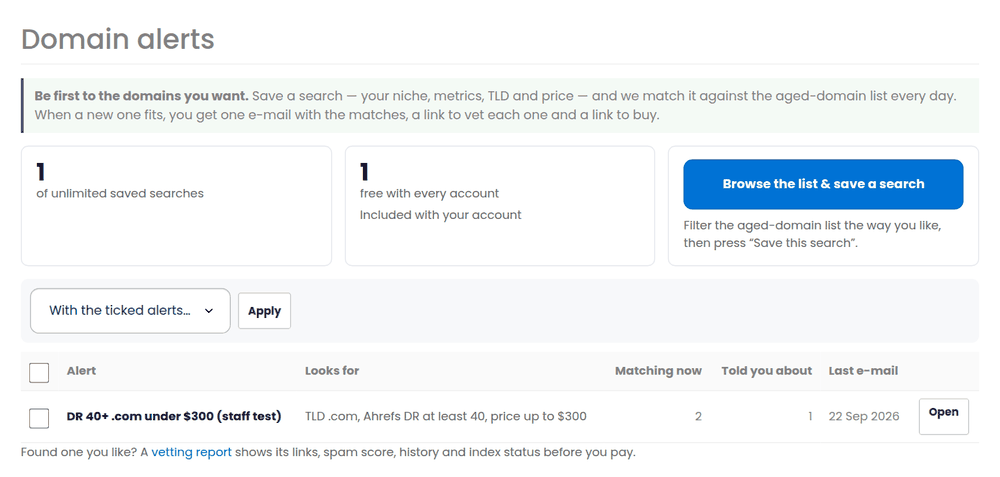
- Open an alert to see the domains matching it now, rename it, or export them as a CSV.
- Tick several and pause, resume or delete them together.
- “See them on the domain list” opens the aged-domain list with exactly that filter applied.
How many searches you can run
Every account — with or without hosting — can keep a saved search running for free. If you hunt in several niches at once, a plan on the plans page raises the number of searches that run at the same time; they still share the one daily e-mail.
- Paused alerts do not count towards the number running.
- If a plan ends, nothing is deleted: the searches above the free allowance are paused and start again the moment you renew.
- Staff accounts run unlimited searches.
From an alert to a decision
An alert tells you a domain exists; a vetting report tells you whether it is worth buying. Every domain in the e-mail and on the alert page has a Vet button that runs the full report — links and spam score, anchor texts, traffic history, what the site used to be, and whether Google still has it.