
Don’t panic. An “ERROR” status on your PBN LTD dashboard is usually a minor hiccup — and in many cases your site is still live and working normally for visitors. This guide explains exactly what ERROR means, how to tell if anything is actually broken, and the two quick paths to fix it depending on when it happened.
📑 What’s in this article
- 🚦 PBN LTD status indicators — full reference
- 🔄 The normal setup flow (what should happen)
- ❗ What “ERROR” actually means
- 🩺 First check — is my site actually down?
- 🔧 Fix path 1: ERROR right after adding the domain
- 🛑 Fix path 2: domain was OK, then went to ERROR
- ⚠️ Severe cases (malware, site offline)
- ❓ Frequently asked questions
🚦 PBN LTD status indicators — full reference
Here’s every status you might see in your dashboard, what it means, and whether you need to do anything:
| Status | What it means | Do you need to act? |
|---|---|---|
| NEW | Domain has just been added to your dashboard. | No — just wait. |
| BUILDING | The system is setting everything up behind the scenes. | No — just wait. |
| WAITING DNS UPDATE | Domain is ready and waiting for you to update the nameservers at your registrar. | ✅ Yes — update your nameservers. |
| ACTIVATING CDN | DNS has resolved and the CDN is being configured. | No — just wait. |
| OK | Everything is live and working correctly. 🎉 | No — you’re done. |
| ERROR | Something went wrong during setup or routine management. Often your site is still live for visitors. | ✅ Yes — see fix paths below. |
🔄 The normal setup flow (what should happen)
When you add a new domain, it moves through these stages in order:
- NEW — domain just added.
- BUILDING — system is setting it up.
- WAITING DNS UPDATE — waiting for you to point the nameservers.
- ACTIVATING CDN — DNS has resolved, CDN is configuring.
- OK — everything is live. ✅
If your domain has been sitting on one of these stages for an unusually long time, or has jumped straight to ERROR, the sections below will get you sorted.
❗ What “ERROR” actually means
The ERROR status means something didn’t complete properly during setup or routine management. It’s typically caused by a small build hiccup — not a serious problem with your site.
✅ The reassuring bit: in most cases, your site remains accessible and functional for visitors, even while it shows as ERROR in the dashboard. The status reflects what we see on our side — not always what visitors see on the front end.
🩺 First check — is my site actually down?
Before doing anything, take 30 seconds to confirm whether visitors can actually reach your site. It’s often fine even with an ERROR status:
- Open your site in a private/incognito browser window (avoids cached results).
- Try the URL from your phone on mobile data (not your home Wi-Fi) — this rules out local DNS or network issues.
- Load your site through a free web proxy like proxysite.com — this fetches your site from a different network entirely, so if it loads there but not for you, the problem is on your end (cache, ISP, local DNS), not the site.
If the site loads normally — good news, you’re probably fine. Carry on with the relevant fix path below to clear the ERROR status itself.
🔧 Fix path 1: ERROR right after adding the domain
If the domain went to ERROR shortly after you added it — i.e. it never reached OK in the first place — this is almost always a build hiccup that you can fix yourself in under a minute by reinstalling the domain.
- Click your site name in the dashboard — this opens the domain’s Control panel.
- Click Reinstall (“Install the site again from scratch”).
- Wait for the domain to move back through the setup stages (BUILDING → WAITING DNS UPDATE → ACTIVATING CDN → OK).
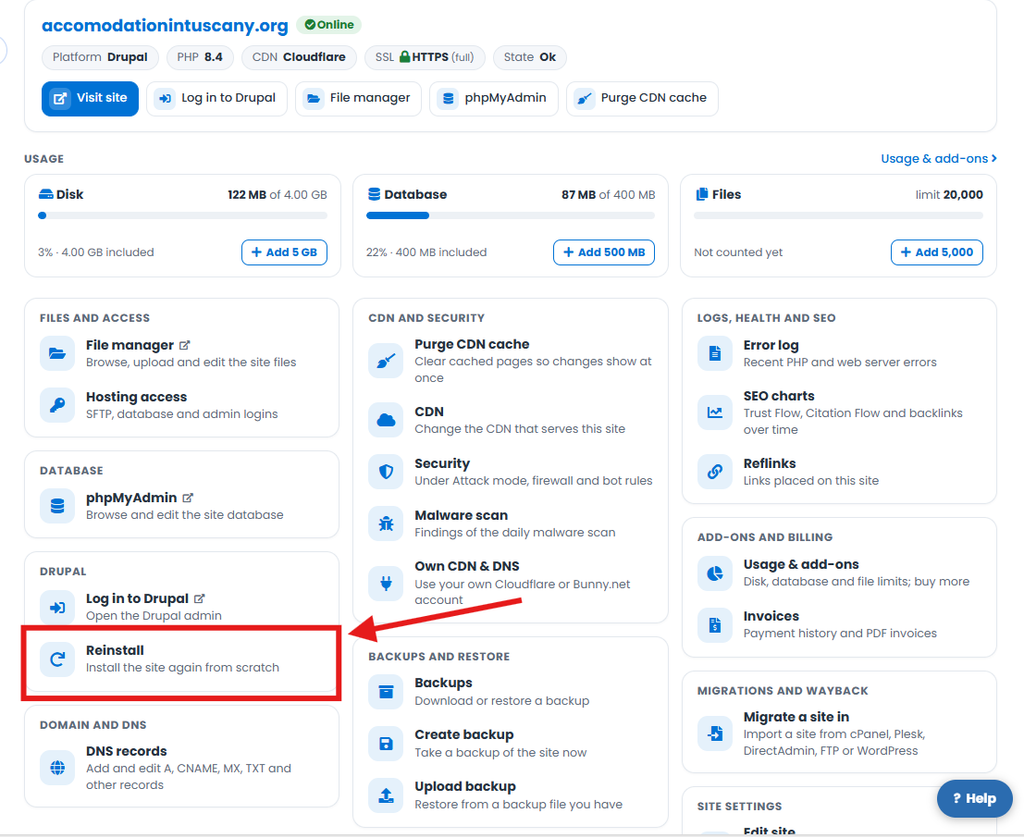
🔧 Reinstall restarts the setup process from scratch and resolves most setup errors quickly and safely. It’s the standard first move when a brand-new domain throws an error.
☁️ Deploying to Cloudflare? Before you reinstall, quickly check cloudflarestatus.com — if Cloudflare is having an outage, the ERROR is on their side and waiting for them to recover is the fix. No amount of reinstalling will help until they’re back to normal.
🛑 Fix path 2: domain was OK, then went to ERROR
🚨 Do not reinstall in this case. If the domain was previously in OK and then went to ERROR, reinstalling can cause more problems than it solves — and it isn’t needed.
Instead, do this:
- Open a support ticket from your dashboard so we can investigate (see How to Submit a Support Ticket if you’re not sure how).
- Mention which domain is affected and roughly when it went from OK to ERROR.
- We’ll diagnose and fix the issue — usually in just a few minutes.
⚠️ Severe cases (malware, site offline)
⚠️ While rare, more serious cases — such as a site that’s been infected with malware — can affect visibility on the front end. If your site appears actually offline to visitors, mention that clearly in your support ticket so we can prioritise the investigation.
❓ Frequently asked questions
Is my site down because it shows ERROR?
Usually not. In most cases the site remains live and accessible to visitors even while the dashboard shows ERROR. Use the First check section above to confirm.
Will I lose my site content if I reinstall?
Yes — if you reinstall an existing site, it will be wiped back to a fresh install. Only use Reinstall if you’ve just added the domain and it’s gone straight into ERROR (i.e. it has never reached OK yet). If the domain was previously in OK in your dashboard — meaning you already have a live site on it — do not reinstall. Submit a support ticket instead and we’ll fix it without touching your content.
Do I need to repoint my nameservers after reinstalling?
No — the nameservers stay the same. And remember: the only reason you should be reinstalling is if you’ve just added the domain and it’s gone into ERROR before reaching OK. In that case you haven’t even pointed the nameservers yet, so there’s nothing to change.
How long does ERROR usually last?
If you trigger a reinstall (Fix path 1), it’ll move out of ERROR as soon as it works through the setup stages again. If it’s a “was OK, then went to ERROR” situation (Fix path 2), our support team will typically have it sorted within minutes of you raising a ticket.
Why did my domain go from OK to ERROR by itself?
The most common causes:
- A failed plugin update on your WordPress site — by far the most common cause.
- A serious malware infection that’s been left to fester — if you ignore malware long enough it can knock the site into ERROR.
- If the domain was newly added, it’s usually CDN API rate limiting or a similar provider-side hiccup — not your fault.
Can I trigger an ERROR by changing settings myself?
Generally no — the dashboard is designed to keep your domain in a healthy state. If you’ve recently changed nameservers, switched CDN providers, or edited site settings and then seen ERROR appear, mention what you changed in your support ticket so we can rule it in or out.
If anything here isn’t clear, or your domain is in a state that doesn’t match any of the above, our support team is happy to take a look — just open a ticket from your dashboard.